Why your Irvine business pin keeps jumping to the wrong street
Why your Irvine business pin keeps jumping to the wrong street
Imagine this: A potential high-value client is driving down Jamboree Road, looking for your professional office near the Irvine Spectrum. They have their smartphone mounted, following the blue line on Google Maps. But as they approach your supposed location, the app directs them to turn into a quiet residential cul-de-sac or a vacant lot three blocks away. Frustrated, they circle the block twice before giving up and calling your competitor. This isn’t just a minor inconvenience; it is a “Ghost Pin” nightmare that costs Irvine business owners thousands in lost revenue every month. When your google business profile seo is compromised by a wandering pin, your physical storefront essentially becomes invisible to the very people trying to find you.
In the competitive Orange County market, map accuracy is a top local seo ranking factor. If Google’s algorithm cannot confidently verify exactly where your front door is located, it will hesitate to rank you in the coveted “Map Pack.” This displacement often feels like a glitch, but it is actually the result of complex data conflicts happening behind the scenes. Whether you are a real estate agent in Turtle Rock or a restaurateur in University Park, understanding why your pin keeps jumping is the first step toward reclaiming your digital real estate. To monitor these shifts in real-time, many experts utilize specialized google maps seo tools to ensure their location data remains static and authoritative.
Fixing a jumping pin isn’t as simple as dragging it back to the right spot. In fact, improper manual adjustments can lead to even bigger headaches. Before you log into your dashboard to “fix” it for the fifth time this week, you need to understand the technical forces pulling your business off the map. This guide will break down the mechanics of pin displacement and provide a roadmap to locking your location in place permanently.
Why Your Google Business Profile Pin Won’t Stay Put
The primary reason your Irvine business pin refuses to stay put usually involves a conflict between different data sources. Google does not rely solely on the information you provide in your dashboard. Instead, it cross-references your data with a massive web of third-party aggregators and official records. If there is a discrepancy, the algorithm may “correct” your pin location based on what it perceives as a more authoritative source.
1. Third-Party Data Overrides
Google constantly “scrapes” data from major aggregators like Data Axle and Neustar Localeze. Additionally, for businesses in our area, Google looks at the City of Irvine business licensing database and the California Secretary of State records. If your business license lists a mailing address (like a P.O. Box or a home office) that differs from your physical storefront, Google’s AI may get confused and pull your pin toward the “official” address on file. This is a common issue for Irvine firms that have recently moved suites within a large office complex or those that use a central administrative address for licensing.
2. User “Suggest an Edit” Abuse
Google Maps is a community-driven platform. Any user – including a confused customer or a malicious competitor – can click “Suggest an edit” on your profile. If multiple users suggest that your business is located elsewhere, or if a “Local Guide” with high authority makes the suggestion, Google may automatically move your pin without notifying you. This is why consistent monitoring of your google business profile seo is vital; you need to catch these “crowdsourced” errors before they become permanent fixtures of your profile.
3. The “Street View” Anchor
Google’s AI uses computer vision to align pins with physical reality. When the Google Street View car drives down Alton Parkway, its cameras capture storefront signage and building numbers. If your pin is placed in the middle of a large parking lot, but the AI detects your logo on a specific building facade 50 yards away, it will attempt to “snap” the pin to the visual evidence. This “Street View Anchor” is often responsible for pins jumping to the back of a building or the wrong side of a shopping center.
4. Algorithmic Glitches and Proximity Logic
The google maps algorithm is designed to prioritize user experience. Sometimes, if your business is located in a high-density area like the Irvine Business Complex (IBC), the algorithm may shift your pin slightly to prevent it from overlapping with a larger, more established “anchor” business. This proximity logic can inadvertently push your pin onto a neighboring street or into a different zip code entirely. Research into local search behavior suggests that third-party data conflicts are the leading cause of these algorithmic “reversions.”
The Danger of Manual “Pin-Fiddling”
When an Irvine business owner sees their pin in the wrong place, their first instinct is to open the Google Business Profile app and drag the pin back to the correct spot. While this seems logical, frequent manual adjustments are a major red flag for Google’s fraud detection systems. “I see it all the time,” says Saqib Shazad, a California-based SEO expert. “Owners get into a ‘tug-of-war’ with the algorithm. They move the pin, Google moves it back 48 hours later, and the owner moves it again. This behavior triggers a ‘verification loop’ that can lead to catastrophic results.”
One of the most significant risks of frequent pin changes is a google business profile suspension. Google’s primary goal is to prevent “spam” businesses from hijacking local results. If you are constantly changing your location data, the system may flag your account for “suspicious activity” and take your entire listing offline. Once suspended, getting your Irvine business back on the map requires a grueling reinstatement process that can take weeks, during which time your lead flow will completely dry up.
Instead of manual “fiddling,” you must address the root cause of the displacement. If your profile is already flagging or if you’ve been hit with a suspension due to address issues, you should consult the specific appeal steps that get suspended Irvine business profiles back online. Professional intervention is often necessary to break the cycle of pin jumping without risking the loss of your hard-earned rankings.
The Irvine Business Owner’s Guide to Permanent Pin Placement
To rank google business profile listings effectively, you need a stable foundation. You cannot build authority on a moving target. If you want to lock your pin in place and improve your google business profile optimization, follow this technical checklist designed for the Irvine market.
Step 1: Audit Your NAP Across the Web
NAP stands for Name, Address, and Phone number. You must ensure that every single mention of your business online – from Yelp and Yellow Pages to the Irvine Chamber of Commerce – uses the exact same address format. If one site says “Suite 200” and another says “Ste 200” or “Floor 2,” Google may view these as different locations, leading to pin instability. Use a google business profile audit tool to identify these inconsistencies quickly.
Step 2: The “Satellite View” Trick
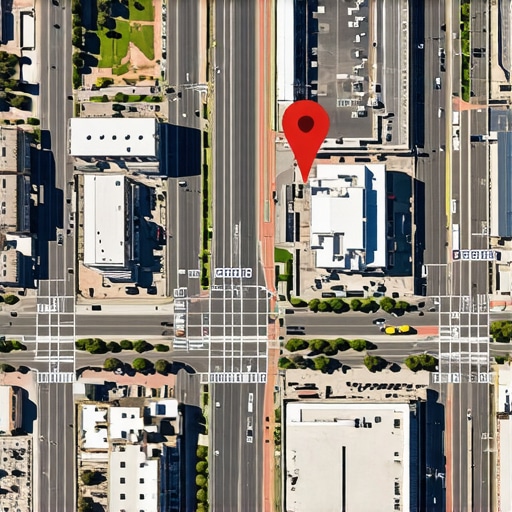
When you are editing your location in the Google Business Profile dashboard, do not rely on the default map view. Switch to “Satellite View.” Zoom in as far as possible and place the pin directly on the roof of your specific office or storefront, ideally over the main entrance. Placing the pin in the “street” or in the middle of a parking lot gives the algorithm too much “wiggle room.” By placing it on the physical structure, you provide a clear signal to the AI that overrides Street View discrepancies.
Step 3: Clear the “Data Trail”
If your pin keeps reverting to an old address, it’s because that old data still exists somewhere in the ecosystem. You need a comprehensive citation cleanup service to hunt down and correct legacy data. This includes updating your business license with the City of Irvine and ensuring your filings with the California Secretary of State are current. Once the “source of truth” is corrected, Google will be less likely to move your pin.
Step 4: Monitor with Professional Tools
Don’t wait for a customer to tell you that your pin is wrong. Use a google maps rank tracker to monitor your location’s performance and accuracy daily. These tools can alert you to unauthorized edits or algorithmic shifts before they impact your bottom line. Consistent monitoring is a hallmark of a high-level gmb ranking service.
Future-Proofing for 2026: AI and Visual Search
The landscape of local search is shifting rapidly. As we look toward local seo trends 2026, the way Google handles pins will become even more automated and visual. We are moving toward a world of AI-generated map pins and augmented reality (AR) navigation. In the near future, car dashboard maps won’t just show a pin on a 2D plane; they will project your business’s 3D location directly onto the driver’s windshield.
To stay ahead of these changes, Irvine businesses must focus on “visual trust signals.” This means uploading high-quality, high-resolution photos of your storefront, your signage, and even the view from the street. Google’s AI uses these photos to confirm that the pin placement matches the physical reality. If your photos show a building on Sand Canyon Ave, but your pin is on Culver Dr, the AI will prioritize the visual data every time. You can learn more about these upcoming shifts in our guide on how to stop your Google Maps Irvine pin from vanishing.
Furthermore, as voice search and AI assistants like Gemini become the primary way people find local services, the precision of your pin becomes even more critical. An AI assistant will not tell a driver to “look around for the sign”; it will give precise coordinates. If those coordinates are off by even twenty feet, the user experience is ruined, and your “trust score” with the search engine drops.
Conclusion: Securing Your Spot in the Irvine Map Pack
A jumping pin is rarely just a technical glitch; it is a symptom of a larger local search optimization issue. Whether it’s conflicting data from the City of Irvine or a “Street View” anchor pulling your location off-course, these errors directly impact your ability to rank higher on google maps and generate consistent leads. In a high-stakes market like Irvine, you cannot afford to have your customers wandering through parking lots because of a displaced pin.
If you have tried the “Satellite View” trick and cleaned up your citations, yet your pin still won’t stay put, it’s time for a professional google maps ranking service. Managing the technical nuances of google business profile seo requires constant vigilance and an expert understanding of Google’s shifting algorithms. Don’t let a wandering pin derail your business growth.
For an authoritative audit of your Google Business Profile or to implement a strategy that will improve google maps ranking, contact Saqib Shazad today. Whether you need a full google business profile optimization or want to leverage the latest local seo software to dominate your niche, we have the tools and expertise to keep your Irvine business exactly where it belongs: right at the top of the map pack.
Author: Saqib Shazad
California Real Estate SEO Expert | I Rank Agents & Investors #1 on Google | Local SEO + Content + Copywriting | Get Off Zillow. Own Your Leads.
Connect on LinkedIn